Integrations ★ Skool
Testimonials on Skool, where no script can run
Skool is the other platform on this list whose answer is no. Its editors are WYSIWYG, the only embeds its docs describe are pasted video links from four providers, and no plan changes any of that. What works is one step simpler than code: testimonial images uploaded to the About-page gallery, and the widget on the page your group card links out to.
- Where the tag goes
- Not on Skool — nothing in the About page, Classroom or posts executes code. Testimonials go in as uploaded images, or the tag goes on the site your group-card links point to.
- Plan needed
- No Skool plan runs custom code. Hobby ($9/month) and Pro ($99/month) share one feature list and differ on the transaction fee — 10% versus 2.9%.
01 Where testimonials can go, and where a tag cannot
First the fact, so nothing downstream surprises you. Skool’s help center has no article on custom code, iframes or widgets — searching it for any of the three returns nothing — and the one thing its docs do call embedding is pasting a video link: “We continue supporting other video hosting platforms that we have always been - YouTube, Vimeo, Loom, and Wistia.” A code field that does not exist cannot take a script tag, and pasting the tag into a Classroom page or a community post just shows it as text. There is no setting, on either plan, that changes this.
Route one: testimonials as images on the About page. Skool’s own setup guide calls that page “essentially a landing/checkout page for your group” and suggests filling its gallery with media such as “what members are saying” — which is a testimonial section in everything but markup:
- Open your group’s About page.
- Click Upload images/videos and add your testimonial cards — the free testimonial image generator turns a quote into a post-ready PNG, and the post template layouts do the same from your approved, consented submissions.
- Write the group description, and click Save.
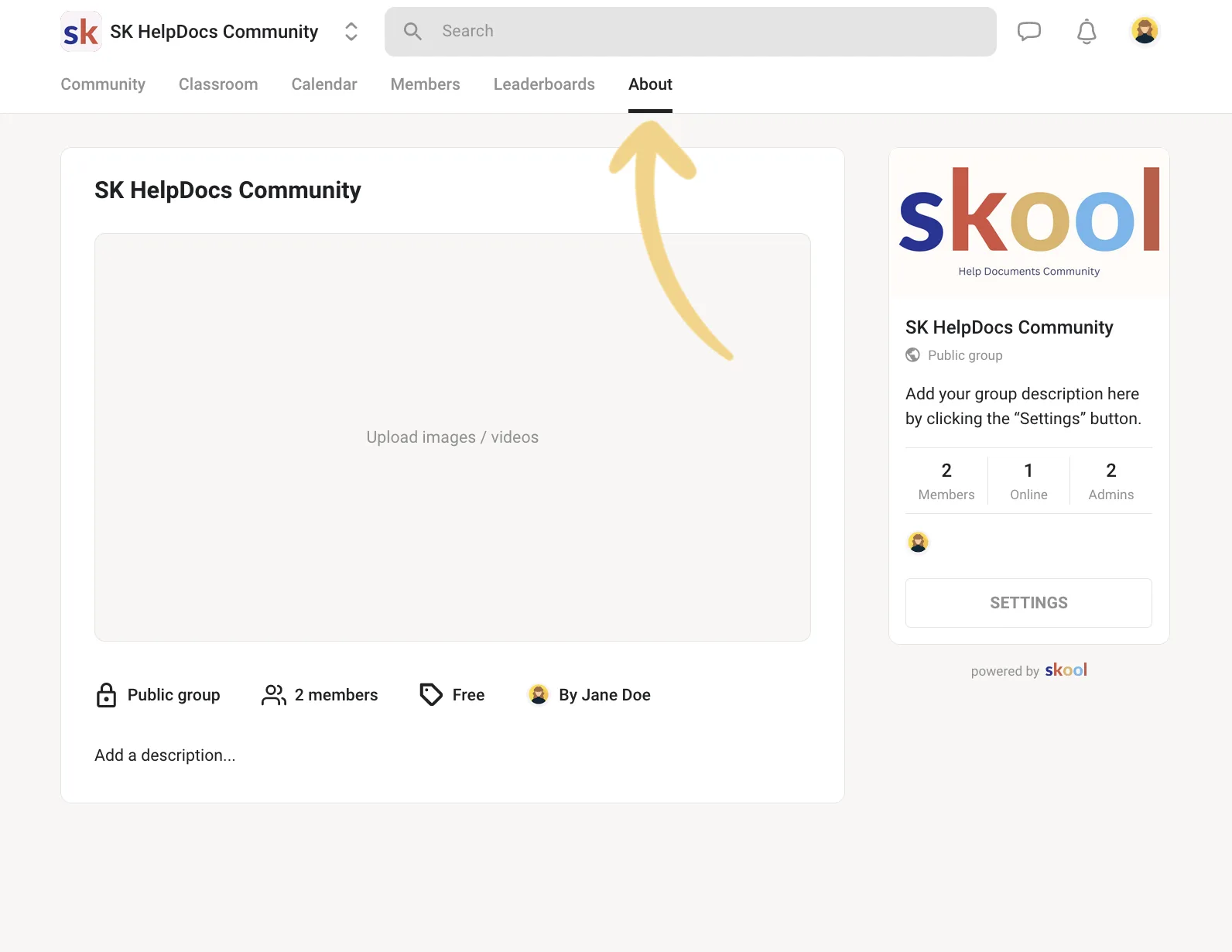
One trap in the description field: Skool disables links there on purpose — “Links in the About page description will not work because they affect click-through & conversion rates.” Write the quotes into the media, not as a link to them.
Route two: the widget on the page your funnel already runs through. Most groups sell from a site they own — the page behind the group card’s links, which Skool’s Links plugin caps at three. That page is yours, so it runs scripts, and that is where the tag goes: paste it into your sales or landing page where the proof belongs, and every visitor Skool sends walks past your testimonials on the way in. The widget updates itself there; the About gallery you refresh by hand.
02 What the plans gate instead
There is nothing to buy, on either plan. Skool’s pricing lists the same features for Hobby at $9/month and Pro at $99/month — unlimited members, courses, videos and live calls — and the difference between them is the transaction fee on paid memberships: 10% on Hobby, 2.9% on Pro. Custom code appears on neither list, because it is not a feature anywhere on the platform.
The docs’ negative space says the same thing loudly. The plugin list is closed — Zapier, a developer webhook, ad-platform pixels, and up to three group-card links — and every one of them is a form field, not a script box. Even analytics goes through Skool’s own pixel plugins rather than a pasted snippet. That is a design decision, not a tier: every group looks like Skool, and no plan buys an exception.
Sources
- Skool — How to set up my group's About page?
- Skool — How to add videos
- Skool — What is Classroom?
- Skool — How to use plugins
- Skool — How to add links
- Skool — Pricing
Plan names and menu labels are the platform’s to change. If what you see differs from what is written here, the linked page is the authority — and tell us so this page gets fixed.
03 When the widget doesn’t show up
- You pasted the tag into a Classroom page or a post and it shows as plain text.
- The editors are WYSIWYG — they format text and never execute it. Nothing is misconfigured, and no retry will change the outcome; on Skool this route does not exist. Use one of the two routes above.
- The link you wrote into the About description is not clickable.
- Deliberate, and documented: “Links in the About page description will not work because they affect click-through & conversion rates.” The sanctioned places for links are the group card — the Links plugin, up to three — and resource links on Classroom pages.
- A video platform’s embed code will not paste.
- Skool takes the video’s share link, never its embed snippet, and only from YouTube, Vimeo, Loom and Wistia — plus its own native upload. For an unlisted YouTube video, Skool’s advice is to “make sure to ‘Allow Embedding’ from YouTube video settings.”
- The testimonial images on the About page have gone stale.
- An uploaded image is a snapshot — unlike the widget, it does not update itself when you approve a new quote. When fresh testimonials land, export new cards and replace the old uploads; the widget on your own site is the surface that stays current on its own.
04 What the one tag actually does
The line you paste is a plain external script. There is no plugin, no app to install, no account to connect on the Skool side, and nothing to configure in the editor afterwards. Testymo generates the tag when you create a widget; the address in it is your widget’s own, and this is the live demo one:
<script src="https://testymo.com/w/demo.js" async></script>The server builds that script per request: the rendering code and your approved testimonials arrive together in one response, so the page makes one request and no follow-up fetches. The demo tag printed above weighs 16.7 KB of JavaScript, about 6 KB over the wire. That figure covers the demo widget's eight quotes. The testimonials ride inside the script rather than arriving in a second request, so a wall carrying thirty of them weighs thirty quotes' worth of text — measure the embed you paste in, not this one. The page-speed guide has the method behind that number, and the case for measuring whatever you embed rather than trusting the category.
It renders into an open shadow root at the exact spot the tag sits, which makes the styling isolation work in both directions: your Skool theme cannot restyle the widget by accident, and the widget’s CSS cannot leak into your page. It sets no cookies, calls no third party, and reads nothing about your visitors. When you approve a new testimonial, it appears on the next page load — you never touch the site again.
05 The widget, running on this page
Everything below this line was drawn by that one script tag — the same file, on the same terms, that the page your group card links to would load. Eight approved testimonials in the wall design, rendered as a free plan renders them, footer link and all.
06 Where to go next
An embed script is one of three ways to put testimonials on a site, and it is not always the right one — a handful of quotes that will not change for a year are better hand-coded. The full guide to adding testimonials to a website prices all three routes: setup, upkeep, and page weight. Once you know the quotes are arriving, the layout patterns guide covers which shape to show them in, and getting permission first covers the part most sites skip.
The same tag, in another editor
- WordPress Custom HTML block
- Webflow Code Embed element
- Wix Embed HTML element
- Squarespace Code block
- Shopify Custom Liquid section
- Framer Embed component
- Ghost HTML card
- Carrd Embed element
- Notion Via Super, or an embed block
- Bubble HTML element
- Kajabi Custom Code block
- Teachable Custom HTML block
- Podia Site-wide code field, or its native section