Integrations ★ Podia
Testimonials on Podia, without a code block
Podia is strict about code: the page editor's Embed tool takes a URL and never markup, and the one place a script tag goes is a site-wide field injected at the foot of every page. No per-page placement exists. So the right move on Podia is different — its site builder ships a native Testimonials section, and the collecting, approving and permission-keeping that fills it is the part a tool still does for you.
- Where the tag goes
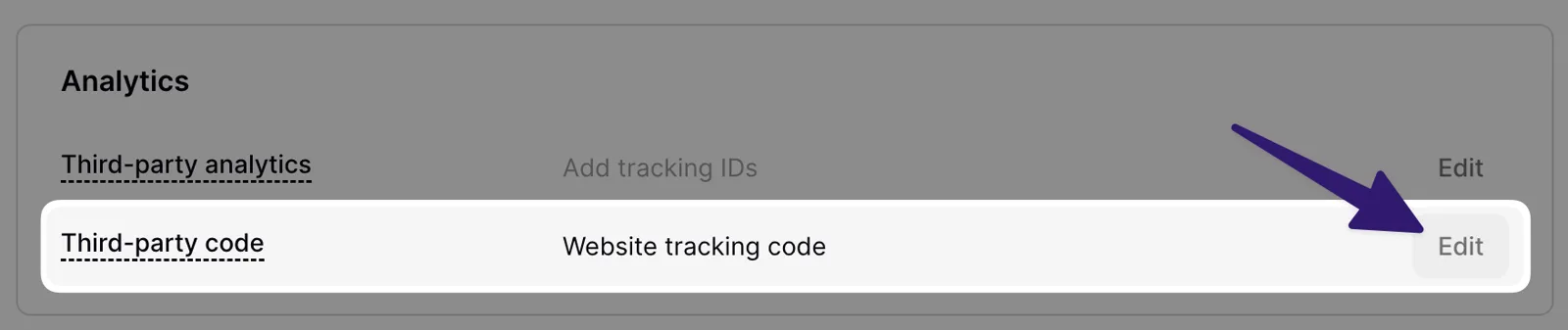
- Nowhere per-page — the editor's Embed tool takes URLs only. A script tag fits one place: Settings → Analytics → Third-party code, injected site-wide before the closing body tag.
- Plan needed
- The Third-party code field needs a paid plan — not the trial — and a verified email. The native Testimonials section and URL embeds are on every plan.
01 Where the tag can go, and why you may not want it there
First the fact, so no route below surprises you. The rich-text editor’s Embed command takes “the unique URL” of the thing being embedded, and Podia’s docs are unambiguous about the rest: “Our embed option in the rich text editor DOES NOT support embed code.” The site builder’s section list — text, image, video, products and the rest — has no HTML or code section either. There is no spot on a Podia page where a script tag can sit.
Route one: Podia’s own Testimonials section. The site builder ships one — hover where the proof belongs, click +, and pick Testimonials from the section menu, then fill each testimonial item in the left-hand sidebar. It is hand-fed: you paste each quote, name and photo in, and new testimonials mean another edit. The half Podia does not do — a collection form people finish, your approval on every word, and the permission recorded alongside — is the half Testymo still does for a Podia site; the words then travel by copy-paste.
Route two: the site-wide code field, stated honestly. Podia’s one
script field is Settings → Analytics → Third-party code, under
Website tracking code: “This code will be added to every page of your
Podia site, just before the closing </body> tag.” This widget
renders exactly where its tag sits — so that placement means the testimonial section
draws at the very bottom of every public page, just above nothing. As a site-wide proof
strip in footer territory that can be a deliberate choice; as “testimonials on my
sales page, here” it is not the tool.
If your setup pairs a Podia storefront with a marketing site you host elsewhere — a common split — the tag simply goes on that site, where every per-page rule is yours again.
02 Whose gate applies, and to what
The gates Podia documents apply to the Third-party code field. Its FAQ for a disabled field lists two: a plan that supports custom code — “If you’re currently on a trial or a plan that doesn’t include this feature, you’ll need to upgrade to a paid plan” — and a verified email address. The current paid plans are Mover ($49/month), Shaker ($99/month) and Earthquaker ($179/month); where older doc pages say the feature “is available on our Mover and Shaker plans”, they were written when those were the only two.
Everything else here is ungated: URL embeds work “on all Podia plans” per the
embed docs, and the Testimonials section is part of the site builder. One more boundary
worth knowing even though this widget does not hit it: tools that must load from the page
<head> are not supported on Podia at all — the code field is a
body-end field, full stop.
Sources
- Podia — Installing third-party apps on your Podia site
- Podia — Embedding audio clips, PDF files, presentations & more
- Podia — Testimonials page section
- Podia — Installing Advanced Analytics
- Podia — Pricing
Plan names and menu labels are the platform’s to change. If what you see differs from what is written here, the linked page is the authority — and tell us so this page gets fixed.
03 When the widget doesn’t show up
- You pasted the widget tag into the Embed tool and got an error, or a plain link.
- Working as documented — that tool takes URLs from supported platforms only and rejects embed code outright. No per-page code route exists to retry; use the Testimonials section for in-page proof.
- You added the tag to Third-party code and cannot see the widget.
- Two documented reasons before anything else: Podia does not output tracking code while you are logged in to your own site — check in a private window — and the code never runs on logged-in areas like the home feed, only on public-facing pages. A stale cache is the third suspect; hard-refresh before digging further.
- The widget renders at the bottom of the page instead of where you wanted it.
-
That is the placement the field buys: injected before
</body>, on every public page, with no per-page control. Nothing is misconfigured. If bottom-of-page is not the design you want, take the tag out and use the Testimonials section instead. - The Third-party code option will not accept anything.
- The documented checklist is short: a paid plan rather than the trial, and a verified email on the account. Both conditions live in Podia’s own FAQ for exactly this symptom.
04 What the one tag actually does
The line you paste is a plain external script. There is no plugin, no app to install, no account to connect on the Podia side, and nothing to configure in the editor afterwards. Testymo generates the tag when you create a widget; the address in it is your widget’s own, and this is the live demo one:
<script src="https://testymo.com/w/demo.js" async></script>The server builds that script per request: the rendering code and your approved testimonials arrive together in one response, so the page makes one request and no follow-up fetches. The demo tag printed above weighs 16.7 KB of JavaScript, about 6 KB over the wire. That figure covers the demo widget's eight quotes. The testimonials ride inside the script rather than arriving in a second request, so a wall carrying thirty of them weighs thirty quotes' worth of text — measure the embed you paste in, not this one. The page-speed guide has the method behind that number, and the case for measuring whatever you embed rather than trusting the category.
It renders into an open shadow root at the exact spot the tag sits, which makes the styling isolation work in both directions: your Podia theme cannot restyle the widget by accident, and the widget’s CSS cannot leak into your page. It sets no cookies, calls no third party, and reads nothing about your visitors. When you approve a new testimonial, it appears on the next page load — you never touch the site again.
05 The widget, running on this page
Everything below this line was drawn by that one script tag — the same file, on the same terms, that Podia's Third-party code field would load site-wide, or that a page you host elsewhere would run. Eight approved testimonials in the wall design, rendered as a free plan renders them, footer link and all.
06 Where to go next
An embed script is one of three ways to put testimonials on a site, and it is not always the right one — a handful of quotes that will not change for a year are better hand-coded. The full guide to adding testimonials to a website prices all three routes: setup, upkeep, and page weight. Once you know the quotes are arriving, the layout patterns guide covers which shape to show them in, and getting permission first covers the part most sites skip.
The same tag, in another editor
- WordPress Custom HTML block
- Webflow Code Embed element
- Wix Embed HTML element
- Squarespace Code block
- Shopify Custom Liquid section
- Framer Embed component
- Ghost HTML card
- Carrd Embed element
- Notion Via Super, or an embed block
- Bubble HTML element
- Kajabi Custom Code block
- Teachable Custom HTML block
- Skool None — images and links only